

Posted by on May 1, 2015
You can now share a link to your browser. Simply select Tools - Share Browser and you'll be presented with this dialog:
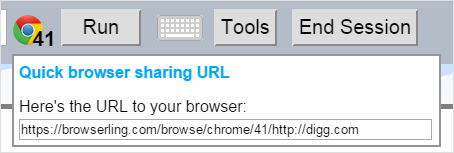
You can simply copy the URL and send it to anyone and when they click it, they'll load the same browser, version, and URL in Browserling.
In general you can create such URL yourself. Here's the structure of the URL
https://www.browserling.com/browse/BROWSER/VERSION/URL
BROWSERisfirefox,chrome,opera,safari, orie.VERSIONis the browser version (for example25for firefox, chrome opera, or9for ie).URLis the URL that you want to load in Browserling, for example,http://www.digg.com.
For example, this URL shares http://www.digg.com in Chrome 25:
https://www.browserling.com/browse/chrome/25/http://www.digg.com
Happy cross-browser testing!


Email this blog post to your friends or yourself!
Try Browserling!
Enter a URL to test, choose platform, browser and version, and you'll get a live interactive browser in 5 seconds!
 Subscribe to updates!
 Follow Us
 BizSpark